

An IDE for AI Coding
My idea for Tug started out as an aid for AI code refactoring. I then expanded out into creating skills and agents to guide the way I created to go from from an idea to a mergeable pull request with AI coding assistance. This turned out great, and over the past several weeks, my plan/implement/merge flow has been how I make virtually all the changes to my software. Yet, the more I got into this work, the more I came to feel that running Claude Code in a terminal—as wonderful and mind-blowingly amazing as it is—isn’t where I spend all my daily software development hours.
I want an app—an IDE for the age of AI coding. So, I decided to do this for myself. These last two words, for myself, are key. I have no idea whether anyone else ever will want to use what I’m making. It’s not a goal, nor is it a non-goal. A for myself approach just the simplest and most straighforward way for me to arrive at what I consider to be good solutions. I ask, “What do I really want here?” And then I do that, or at least try to.
I’m also lucky in that I have no time constraints. I don’t work for anyone, and I don’t plan to anytime soon. This confers a freedom for me to pursue my interests in the things I find most compelling every day, and to take the time to “do things right” in a way I get to define for myself. I’m also pretty opinionated, and I just make choices that suit me on a wide variety of topics. So there. As I said, I’m lucky.
One of the most basic questions I’ve asked myself is what an AI coding IDE should even look like, and be like, and how I should build it. Obviously, conversing / “chatting” with an AI assistant is a big part of the overall approach, but at a level even more fundamental than that, I have a question about what tech stack I should use to build this IDE around.
Part of me really wishes that a native Mac app was the answer, but I feel like Apple has drifted for more than ten years about what it means to write serious apps for the Mac. For me, native Mac development is not the future—at least it’s not the lynchpin it once was. Pity. Electron, inevitably, seems to come with a ton of bloat. Pass.
I got some experience writing React apps for the web during my time at Infactory, the startup I used to work at, but I was frustrated by how uncontrolled the state and rendering system was. It felt like it encouraged spaghetti code with a dizzyingly over-connected chain of dependencies. But, I used AI to study some well-made open-source projects, like Excalidraw, which seem to have tamed the tangle, and I developed a set of rules for developing with React. I also adopted Radix Primitives as the core of my UI component system.
I do actually load this web tech into the thinnest Mac app I could possibly write. Mostly, it’s the approach that game developers take. Ask the native OS for a window, and but then steer away from the native app frameworks. This leaves me with so much to do to get an app I’d like to spend time in. But that’s OK. I have time.
For the past few days, I’ve been working at the meeting point between a set of core components (e.g. buttons, badges, sliders, checkboxes), a system for creating themes that provides flexibility for specifying different look-and-feel light/dark options while rendering these components in a legible and accessible fashion, and a color palette system for naming and specifying colors in a pleasant fashion that is amenable to the theme system and CSS.
There’s so much to talk about, and so much work to do. So for now, here are a few words on the color palette system.
TugColor Palette System
Overview
The TugColor palette is a named color vocabulary for the --tug-color() CSS notation. Every color has a human-readable name — no numeric codes, no degree offsets, no mental math. Colors are specified by four axes: color (hue name), intensity (chroma, 0–100), tone (lightness, 0–100), and alpha (opacity, 0–100).
This document describes the naming system. For the --tug-color() syntax and the intensity/tone/alpha axes, see the parser and palette engine module docs.
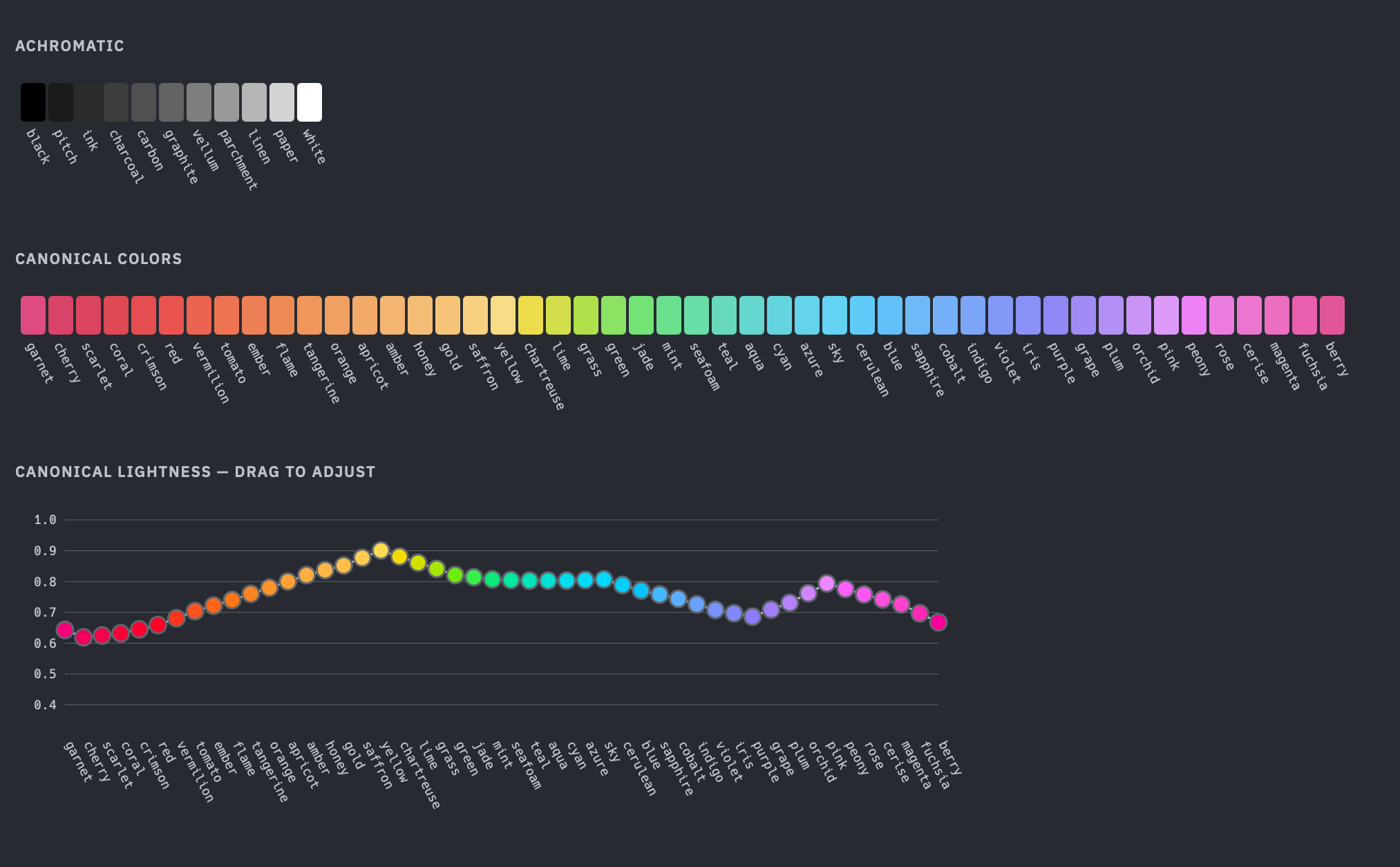
Basic system: 60 named colors
The basic vocabulary has 60 names across three categories.
48 chromatic colors
48 named hue families arranged in a circular ring, mapped to OKLCH hue angles. Names are drawn from gemstones, flowers, fruits, spices, pigments, and natural phenomena.
Listed in ring order by hue angle:
| Chip | # | Name | Hue ° |
|---|---|---|---|
| 1 | garnet | 2.5° | |
| 2 | cherry | 10° | |
| 3 | scarlet | 15° | |
| 4 | coral | 20° | |
| 5 | crimson | 22.5° | |
| 6 | red | 25° | |
| 7 | vermilion | 30° | |
| 8 | tomato | 35° | |
| 9 | ember | 40° | |
| 10 | flame | 45° | |
| 11 | tangerine | 50° | |
| 12 | orange | 55° | |
| 13 | apricot | 60° | |
| 14 | amber | 65° | |
| 15 | honey | 70° | |
| 16 | gold | 75° | |
| 17 | saffron | 82.5° | |
| 18 | yellow | 90° | |
| 19 | chartreuse | 102.5° | |
| 20 | lime | 115° | |
| 21 | grass | 127.5° | |
| 22 | green | 140° | |
| 23 | jade | 147.5° | |
| 24 | mint | 155° | |
| 25 | seafoam | 165° | |
| 26 | teal | 175° | |
| 27 | aqua | 187.5° | |
| 28 | cyan | 200° | |
| 29 | azure | 207.5° | |
| 30 | sky | 215° | |
| 31 | cerulean | 222.5° | |
| 32 | blue | 230° | |
| 33 | sapphire | 240° | |
| 34 | cobalt | 250° | |
| 35 | indigo | 260° | |
| 36 | violet | 270° | |
| 37 | iris | 277.5° | |
| 38 | purple | 285° | |
| 39 | grape | 292.5° | |
| 40 | plum | 300° | |
| 41 | orchid | 310° | |
| 42 | pink | 320° | |
| 43 | peony | 327.5° | |
| 44 | rose | 335° | |
| 45 | cerise | 340° | |
| 46 | magenta | 345° | |
| 47 | fuchsia | 350° | |
| 48 | berry | 355° |
The ring wraps: berry (355°) and garnet (2.5°) are adjacent.
Canonical lightness
Each hue has a canonical lightness (canonical L) — the OKLCH lightness at which that hue achieves an aesthetically-pleasing chroma. This is the lightness where the color looks most like itself: the most “natural” and “expected” version of a color (to me) that fits in the sRGB gamut. Canonical L varies significantly across hues because the sRGB gamut boundary is irregular in OKLCH space. Yellow is naturally bright at peak saturation (canonical L = 0.901), while cherry is naturally dark (canonical L = 0.619). These values are chosen aesthetically.
The tone axis (0–100) maps to OKLCH lightness through canonical L as a piecewise linear function with a hinge at tone 50:
tone  0  →  L_DARK  (0.15)     darkest
tone 50  →  canonical L        per-hue tuned lightness
tone 100 →  L_LIGHT (0.96)     lightest
The lower half (tone 0–50) interpolates linearly between L_DARK and canonical L. The upper half (tone 50–100) interpolates between canonical L and L_LIGHT. This means the tone scale is perceptually centered on each hue’s natural brightness — tone 50 always gives you a suitably canonical version of that color, regardless of whether the hue is naturally light (like yellow) or naturally dark (like cherry).
Each hue traces a line from L_DARK through its canonical L to L_LIGHT, and the varying heights of the hinge points show how different hues peak at different lightness levels.
11 achromatic colors
11 named values on a linear light-to-dark scale. The endpoints are black and white. The nine intermediates are named for craft and mark-making materials — writing surfaces on the light end, pigments and residues on the dark end.
| Chip | Name | Tone | L (oklch) |
|---|---|---|---|
| black | 0 | 0.000 | |
| pitch | 10 | 0.220 | |
| ink | 20 | 0.290 | |
| charcoal | 30 | 0.360 | |
| carbon | 40 | 0.430 | |
| graphite | 50 | 0.500 | |
| vellum | 60 | 0.592 | |
| parchment | 70 | 0.684 | |
| linen | 80 | 0.776 | |
| paper | 90 | 0.868 | |
| white | 100 | 1.000 |
These are fixed-lightness values. --tug-color(graphite) always means L=0.5, C=0. Intensity and tone parameters are ignored (with a warning). Alpha is honored.
The gray pseudo-hue remains available for continuous achromatic access at any tone: --tug-color(gray, t: 37) produces an arbitrary gray. Named grays are the fixed reference points; gray is the continuous slider.
1 transparent
--tug-color(transparent) expands to oklch(0 0 0 / 0). All parameters are ignored. Transparent does not participate in any adjacency system.
Extended system: 176 named colors
The extended vocabulary adds hyphenated adjacency pairs to the 60 basic names.
Chromatic adjacency (circular ring)
Any two adjacent colors on the 48-color hue ring can be hyphenated. The first name is dominant — it contributes 2/3 of the hue angle, the second contributes 1/3.
hue(A-B) = (2/3 × angle(A)) + (1/3 × angle(B))Order matters. yellow-chartreuse and chartreuse-yellow are different colors:
| Chip | Expression | Hue ° |
|---|---|---|
| yellow | 90.0° | |
| yellow-chartreuse | 94.2° | |
| chartreuse-yellow | 98.3° | |
| chartreuse | 102.5° |
The ring is circular — berry (355°) and garnet (2.5°) are adjacent and wrap correctly across the 360°/0° boundary.
48 adjacent pairs × 2 orderings = 96 hyphenated chromatic colors.
Achromatic adjacency (linear sequence)
The 11 achromatic colors form a linear (non-wrapping) sequence. Black and white are not adjacent — there is no wrap. Adjacency uses the same 2/3 + 1/3 weighting, applied to lightness instead of hue angle.
L(A-B) = (2/3 × L(A)) + (1/3 × L(B))10 adjacent pairs × 2 orderings = 20 hyphenated achromatic colors.
Adjacency rules
- Only adjacent pairs are valid.
yellow-chartreuseworks because they are neighbors.yellow-blueis a hard error at parse time. - Order encodes bias. The first name gets 2/3 weight.
A-Bis always closer to A. - Non-adjacent pairs are rejected, not silently resolved. This catches typos and misunderstandings early.
Presets compose with adjacency
Presets (light, dark, intense, muted, canonical) can follow a hyphenated pair:
--tug-color(cobalt-indigo-intense)         /* hue from adjacency, i/t from preset */
--tug-color(cobalt-indigo-intense, t: 30)  /* preset with tone override */
The color token is parsed as a minus-separated chain of up to three idents: COLOR, COLOR-PRESET, COLOR-ADJACENT, or COLOR-ADJACENT-PRESET.
Color counts
| Category | Base | Hyphenated | Total |
|---|---|---|---|
| Chromatic | 48 | 96 | 144 |
| Achromatic | 11 | 20 | 31 |
| Transparent | 1 | 0 | 1 |
| Total | 60 | 116 | 176 |